just conclude this semester's study. this is my first semester and is an impressive semester. I feel like changes always happen from the first class not only on my knowledge. I really appreciate two lecturers who keeping dedicated in teaching all the time.I want to say the online lecture is absolutely helpful.
one more thing, thank my different ages' mates for giving me help and feedback on my work especially my group mates as well.
Sunday, 6 November 2011

Tuesday, 1 November 2011
Sunday, 30 October 2011
friendly way to embed swf
i believe you guys may use flash player as media player or want to use some swf file on your webpage. have you occured such problem that W3C doesn't pass your validation? here is a little trick to help you insert swf friendly.
Required attributes:
Example:
STEP 1: Embed both Flash content and alternative content using standards compliant markup
SWFObject's base markup uses the nested-objects method (with proprietary Internet Explorer conditional comments. See Flash Embedding Cage Match) to ensure the most optimal cross-browser support by means of markup only, while being standards compliant and supporting alternative content (See Flash Embed Test Suite):<!DOCTYPE html PUBLIC "-//W3C//DTD XHTML 1.0 Strict//EN" "http://www.w3.org/TR/xhtml1/DTD/xhtml1-strict.dtd"> <html xmlns="http://www.w3.org/1999/xhtml" lang="en" xml:lang="en"> <head> <title>SWFObject - step 1</title> <meta http-equiv="Content-Type" content="text/html; charset=iso-8859-1" /> </head> <body> <div> <object classid="clsid:D27CDB6E-AE6D-11cf-96B8-444553540000" width="780" height="420"> <param name="movie" value="myContent.swf" /> <!--[if !IE]>--> <object type="application/x-shockwave-flash" data="myContent.swf" width="780" height="420"> <!--<![endif]--> <p>Alternative content</p> <!--[if !IE]>--> </object> <!--<![endif]--> </object> </div> </body> </html>NOTE: The nested-objects method requires a double object definition (the outer object targeting Internet Explorer and the inner object targeting all other browsers), so you need to define your object attributes and nested param elements twice.
Required attributes:
- classid (outer object element only, value is always clsid:D27CDB6E-AE6D-11cf-96B8-444553540000)
- type (inner object element only, value is always application/x-shockwave-flash)
- data (inner object element only, defines the URL of a SWF)
- width (both object elements, defines the width of a SWF)
- height (both object elements, defines the height of a SWF)
- movie (outer object element only, defines the URL of a SWF)
How can you use HTML to configure your Flash content?
You can add the following often-used optional attributes to the object element:- id
- name
- class
- align
- play
- loop
- menu
- quality
- scale
- salign
- wmode
- bgcolor
- base
- swliveconnect
- flashvars
- devicefont (more info)
- allowscriptaccess (more info here and here)
- seamlesstabbing (more info)
- allowfullscreen (more info)
- allownetworking (more info)
Why should you use alternative content?
The object element allows you to nest alternative content inside of it, which will be displayed if Flash is not installed or supported. This content will also be picked up by search engines, making it a great tool for creating search-engine-friendly content. Summarizing, you should use alternative content when you like to create content that is accessible for people who browse the Web without plugins, create search-engine-friendly content or tell visitors that they can have a richer user experience by downloading the Flash plug-in.STEP 2: Include the SWFObject JavaScript library in the head of your HTML page
The SWFObject library consists of one external JavaScript file. SWFObject will be executed as soon as it is read and will perform all DOM manipulations as soon as the DOM is loaded - for all browsers that support this, like IE, Firefox, Safari and Opera 9+ - or otherwise as soon as the onload event fires:<!DOCTYPE html PUBLIC "-//W3C//DTD XHTML 1.0 Strict//EN" "http://www.w3.org/TR/xhtml1/DTD/xhtml1-strict.dtd"> <html xmlns="http://www.w3.org/1999/xhtml" lang="en" xml:lang="en"> <head> <title>SWFObject - step 2</title> <meta http-equiv="Content-Type" content="text/html; charset=iso-8859-1" /> <script type="text/javascript" src="swfobject.js"></script> </head> <body> <div> <object classid="clsid:D27CDB6E-AE6D-11cf-96B8-444553540000" width="780" height="420"> <param name="movie" value="myContent.swf" /> <!--[if !IE]>--> <object type="application/x-shockwave-flash" data="myContent.swf" width="780" height="420"> <!--<![endif]--> <p>Alternative content</p> <!--[if !IE]>--> </object> <!--<![endif]--> </object> </div> </body> </html>
STEP 3: Register your Flash content with the SWFObject library and tell SWFObject what to do with it
First add a unique id to the outer object tag that defines your Flash content. Second add the swfobject.registerObject method:- The first argument (String, required) specifies the id used in the markup.
- The second argument (String, required) specifies the Flash player version your content is published for. It activates the Flash version detection for a SWF to determine whether to show Flash content or force alternative content by doing a DOM manipulation. While Flash version numbers normally consist of major.minor.release.build, SWFObject only looks at the first 3 numbers, so both "WIN 9,0,18,0" (IE) or "Shockwave Flash 9 r18" (all other browsers) will translate to "9.0.18". If you only want to test for a major version you can omit the minor and release numbers, like "9" instead of "9.0.0".
- The third argument (String, optional) can be used to activate Adobe express install and specifies the URL of your express install SWF file. Express install displays a standardized Flash plugin download dialog instead of your Flash content when the required plugin version is not available. A default expressInstall.swf file is packaged with the project. It also contains the corresponding expressInstall.fla and AS files (in the SRC directory) to let you create your own custom express install experience. Please note that express install will only fire once (the first time that it is invoked), that it is only supported by Flash Player 6.0.65 or higher on Win or Mac platforms, and that it requires a minimal SWF size of 310x137px.
- The fourth argument (JavaScript function, optional) can be used to define a callback function that is called on both success or failure of creating a Flash plug-in <object> on the page (see API documentation)
<!DOCTYPE html PUBLIC "-//W3C//DTD XHTML 1.0 Strict//EN" "http://www.w3.org/TR/xhtml1/DTD/xhtml1-strict.dtd">
<html xmlns="http://www.w3.org/1999/xhtml" lang="en" xml:lang="en">
  <head>
    <title>SWFObject - step 3</title>
    <meta http-equiv="Content-Type" content="text/html; charset=iso-8859-1" />
    <script type="text/javascript" src="swfobject.js"></script>

    <script type="text/javascript">
    swfobject.registerObject("myId", "9.0.115", "expressInstall.swf");
    </script>

  </head>
  <body>
    <div>

      <object id="myId" classid="clsid:D27CDB6E-AE6D-11cf-96B8-444553540000" width="780" height="420">

        <param name="movie" value="myContent.swf" />
        <!--[if !IE]>-->
        <object type="application/x-shockwave-flash" data="myContent.swf" width="780" height="420">
        <!--<![endif]-->
          <p>Alternative content</p>
        <!--[if !IE]>-->
        </object>
        <!--<![endif]-->
      </object>
    </div>
  </body>
</html>
TIPS
- Use the SWFObject HTML and JavaScript generator to help you author your code
- Just repeat steps 1 and 3 to embed multiple SWF files into one HTML page
- The easiest way to reference the active object element is by using the JavaScript API: `swfobject.getObjectById(objectIdStr)
How to embed Flash Player content using SWFObject dynamic publishing
STEP 1: Create alternative content using standards compliant markup
SWFObject's dynamic embed method follows the principle of progressive enhancement and replaces alternative HTML content for Flash content when enough JavaScript and Flash plug-in support is available. First define your alternative content and label it with an id:<!DOCTYPE html PUBLIC "-//W3C//DTD XHTML 1.0 Strict//EN" "http://www.w3.org/TR/xhtml1/DTD/xhtml1-strict.dtd"> <html xmlns="http://www.w3.org/1999/xhtml" lang="en" xml:lang="en"> <head> <title>SWFObject dynamic embed - step 1</title> <meta http-equiv="Content-Type" content="text/html; charset=iso-8859-1" /> </head> <body> <div id="myContent"> <p>Alternative content</p> </div> </body> </html>
STEP 2: Include the SWFObject JavaScript library in the head of your HTML page
The SWFObject library consists of one external JavaScript file. SWFObject will be executed as soon as it is read and will perform all DOM manipulations as soon as the DOM is loaded - for all browsers that support this, like IE, Firefox, Safari and Opera 9+ - or otherwise as soon as the onload event fires:<!DOCTYPE html PUBLIC "-//W3C//DTD XHTML 1.0 Strict//EN" "http://www.w3.org/TR/xhtml1/DTD/xhtml1-strict.dtd"> <html xmlns="http://www.w3.org/1999/xhtml" lang="en" xml:lang="en"> <head> <title>SWFObject dynamic embed - step 2</title> <meta http-equiv="Content-Type" content="text/html; charset=iso-8859-1" /> <script type="text/javascript" src="swfobject.js"></script> </head> <body> <div id="myContent"> <p>Alternative content</p> </div> </body> </html>
STEP 3: Embed your SWF with JavaScript
swfobject.embedSWF(swfUrl, id, width, height, version, expressInstallSwfurl, flashvars, params, attributes, callbackFn) has five required and five optional arguments:- swfUrl (String, required) specifies the URL of your SWF
- id (String, required) specifies the id of the HTML element (containing your alternative content) you would like to have replaced by your Flash content
- width (String, required) specifies the width of your SWF
- height (String, required) specifies the height of your SWF
- version (String, required) specifies the Flash player version your SWF is published for (format is: "major.minor.release" or "major")
- expressInstallSwfurl (String, optional) specifies the URL of your express install SWF and activates Adobe express install. Please note that express install will only fire once (the first time that it is invoked), that it is only supported by Flash Player 6.0.65 or higher on Win or Mac platforms, and that it requires a minimal SWF size of 310x137px.
- flashvars (Object, optional) specifies your flashvars with name:value pairs
- params (Object, optional) specifies your nested object element params with name:value pairs
- attributes (Object, optional) specifies your object's attributes with name:value pairs
- callbackFn (JavaScript function, optional) can be used to define a callback function that is called on both success or failure of creating a Flash plug-in <object> on the page (see API documentation)
<!DOCTYPE html PUBLIC "-//W3C//DTD XHTML 1.0 Strict//EN" "http://www.w3.org/TR/xhtml1/DTD/xhtml1-strict.dtd">
<html xmlns="http://www.w3.org/1999/xhtml" lang="en" xml:lang="en">
  <head>
    <title>SWFObject dynamic embed - step 3</title>
    <meta http-equiv="Content-Type" content="text/html; charset=iso-8859-1" />
    <script type="text/javascript" src="swfobject.js"></script>

    <script type="text/javascript">
    swfobject.embedSWF("myContent.swf", "myContent", "300", "120", "9.0.0");
    </script>

  </head>
  <body>
    <div id="myContent">
      <p>Alternative content</p>
    </div>
  </body>
</html>
How can you configure your Flash content?
You can add the following often-used optional attributes to the object element:- id (NOTE: when undefined, the object element automatically inherits the id from the alternative content container element)
- align
- name
- styleclass (see note about class)
- class
Example:
var attributes = {
   id: "myId",
   align: "left",
   styleclass: "myclass"
};
If you would rather use class instead of styleclass, wrap the word class in quotes like this:
var attributes = {
   id: "myId",
   align: "left",
   "class": "myclass"
};
You can use the following optional Flash specific param elements (more info):
- play
- loop
- menu
- quality
- scale
- salign
- wmode
- bgcolor
- base
- swliveconnect
- flashvars
- devicefont (more info)
- allowscriptaccess (more info here and here)
- seamlesstabbing (more info)
- allowfullscreen (more info)
- allownetworking (more info)
How do you use JavaScript Objects to define your flashvars, params and object's attributes?
You can best define JavaScript Objects using the Object literal notation, which looks like:<script type="text/javascript"> var flashvars = {}; var params = {}; var attributes = {}; swfobject.embedSWF("myContent.swf", "myContent", "300", "120", "9.0.0","expressInstall.swf", flashvars, params, attributes); </script>You can add your name:value pairs while you define an object (note: please make sure not to put a comma behind the last name:value pair inside an object)
<script type="text/javascript">
var flashvars = {
  name1: "hello",
  name2: "world",
  name3: "foobar"
};
var params = {
  menu: "false"
};
var attributes = {
  id: "myDynamicContent",
  name: "myDynamicContent"
};

swfobject.embedSWF("myContent.swf", "myContent", "300", "120", "9.0.0","expressInstall.swf", flashvars, params, attributes);
</script>
Or add properties and values after its creation by using a dot notation:
<script type="text/javascript">
var flashvars = {};
flashvars.name1 = "hello";
flashvars.name2 = "world";
flashvars.name3 = "foobar";
var params = {};
params.menu = "false";
var attributes = {};
attributes.id = "myDynamicContent";
attributes.name = "myDynamicContent";

swfobject.embedSWF("myContent.swf", "myContent", "300", "120", "9.0.0","expressInstall.swf", flashvars, params, attributes);
</script>
Which can also be written as (the less readable shorthand version for the die-hard scripter who love one-liners):
<script type="text/javascript">

swfobject.embedSWF("myContent.swf", "myContent", "300", "120", "9.0.0","expressInstall.swf", {name1:"hello",name2:"world",name3:"foobar"}, {menu:"false"}, {id:"myDynamicContent",name:"myDynamicContent"});
</script>
If you don't want to use an optional argument you can define it as false or as an empty Object (NOTE: from SWFObject 2.1 onwards you can also use null or 0):
<script type="text/javascript">
var flashvars = false;
var params = {};
var attributes = {
  id: "myDynamicContent",
  name: "myDynamicContent"
};

swfobject.embedSWF("myContent.swf", "myContent", "300", "120", "9.0.0","expressInstall.swf", flashvars, params, attributes);
</script>
The flashvars Object is a shorthand notation that is there for your ease of use. You could potentially ignore it and specify your flashvars via the params Object:
<script type="text/javascript">
var flashvars = false;
var params = {
  menu: "false",
  flashvars: "name1=hello&name2=world&name3=foobar"
};
var attributes = {
  id: "myDynamicContent",
  name: "myDynamicContent"
};

swfobject.embedSWF("myContent.swf", "myContent", "300", "120", "9.0.0","expressInstall.swf", flashvars, params, attributes);
</script>
Saturday, 29 October 2011
sprite me
when i optimize my website with firebug, it recommends me sprite me this tool to optimize my css. then i tried it, actually it indeed speed up my loading speed. so share with guys....
Those of you that care about website performance have probably read about combining images, something that’s called “CSS sprites”. The idea is that by using the same (somewhat larger) image several times, you get fewer HTTP requests to your site, and therefore speed it up. Problem is, most of your images are CSS background images, that are positioned using clever background-positions and repeats.
Now, this makes to tricky to combine images. Something that repeats horizontally can’t be combined with something that repeats vertically (unless there’s transparency involved), and wide images can’t be combined with narrow ones. So combining is usually tedious, manual work, both to combine the images and then calculate the new background-positions required.
Lucky for us then, that there is a tool called SpriteMe, available as a bookmarklet (a bookmark containing javascript), and as an excellent online demo that walks you through how it works. SpriteMe does all the hard work for you, you just have to copy and paste both the combined images, and the new background rules, to your site.
Those of you that care about website performance have probably read about combining images, something that’s called “CSS sprites”. The idea is that by using the same (somewhat larger) image several times, you get fewer HTTP requests to your site, and therefore speed it up. Problem is, most of your images are CSS background images, that are positioned using clever background-positions and repeats.
Now, this makes to tricky to combine images. Something that repeats horizontally can’t be combined with something that repeats vertically (unless there’s transparency involved), and wide images can’t be combined with narrow ones. So combining is usually tedious, manual work, both to combine the images and then calculate the new background-positions required.
Lucky for us then, that there is a tool called SpriteMe, available as a bookmarklet (a bookmark containing javascript), and as an excellent online demo that walks you through how it works. SpriteMe does all the hard work for you, you just have to copy and paste both the combined images, and the new background rules, to your site.
Wednesday, 26 October 2011
Login doesn't "stick" after upgrade to PHP 5.2+
This is a specific problem that affects older versions of Drupal on a server running PHP 5.2 or later. Often it arises when PHP is upgraded (sometimes without your knowing!).
Symptom: You can appear to log in OK, but on the very next page view the system seems to forget that you have just logged in and you revert to being an "anonymous" user.
If you are running Drupal 5.x or later then this specific problem won't affect you, so if you still have trouble staying logged in then check here.
This problem occurs due to the way PHP 5.2+ handles objects in session handlers. It affects all Drupal versions up to Drupal 4.6.10, Drupal 4.7.4 and Drupal 5-beta 1 inclusive.
The best method of fixing this is to upgrade to the latest official release of a supported version of Drupal. Currently (Dec 2008) this means the latest release of either the 5.x or the 6.x series.
For those wishing not to do a full upgrade yet but who need an "instant fix", you can add the following line at the bottom of your settings.php file:
You should regard this as a temporary fix only. If you subsequently upgrade your site to a newer version of Drupal you should remove this line from settings.php to prevent potential incompatibility with future versions of Drupal.
The problem is fixed in the 4.6.11 and 4.7.5 releases of Drupal. So another option for 4.6.x and 4.7.x users is to upgrade to the final release of the 4.6.x/4.7.x series - 4.6.11 or 4.7.11, which are available here.
Note that while Drupal 5.0 doesn't exhibit this particular problem with PHP 5.2 it is still not fully compatible with this version of PHP; Drupal 5.1 is fully compatible (but of course doesn't contain the security fixes in the latest 5.x release).
Here is the original issue in which this problem was identifed and fixed.
Symptom: You can appear to log in OK, but on the very next page view the system seems to forget that you have just logged in and you revert to being an "anonymous" user.
If you are running Drupal 5.x or later then this specific problem won't affect you, so if you still have trouble staying logged in then check here.
This problem occurs due to the way PHP 5.2+ handles objects in session handlers. It affects all Drupal versions up to Drupal 4.6.10, Drupal 4.7.4 and Drupal 5-beta 1 inclusive.
The best method of fixing this is to upgrade to the latest official release of a supported version of Drupal. Currently (Dec 2008) this means the latest release of either the 5.x or the 6.x series.
For those wishing not to do a full upgrade yet but who need an "instant fix", you can add the following line at the bottom of your settings.php file:
// Temporary fix to login/sessions problem.

// Remove this line when upgrading to 4.6.11, 4.7.11 or 5.x or later.

register_shutdown_function('session_write_close');The problem is fixed in the 4.6.11 and 4.7.5 releases of Drupal. So another option for 4.6.x and 4.7.x users is to upgrade to the final release of the 4.6.x/4.7.x series - 4.6.11 or 4.7.11, which are available here.
Note that while Drupal 5.0 doesn't exhibit this particular problem with PHP 5.2 it is still not fully compatible with this version of PHP; Drupal 5.1 is fully compatible (but of course doesn't contain the security fixes in the latest 5.x release).
Here is the original issue in which this problem was identifed and fixed.
Monday, 3 October 2011
several awesome css menues
Vertical Pop Out Menu
#menu {
width: 12em; /* set width of menu */
background: #eee;
}

#menu ul { /* remove bullets and list indents */
list-style: none;
margin: 0;
padding: 0;
}

/* style, color and size links and headings to suit */
#menu a, #menu h2 {
font: bold 11px/16px arial, helvetica, sans-serif;
display: block;
border-width: 1px;
border-style: solid;
border-color: #ccc #888 #555 #bbb;
margin: 0;
padding: 2px 3px;
}

#menu h2 {
color: #fff;
background: #000;
text-transform: uppercase;
}

#menu a {
color: #000;
background: #efefef;
text-decoration: none;
}

#menu a:hover {
color: #a00;
background: #fff;
}
The CSS above removes the padding/margin and bullets from all the lists, sets the width of the the entire menu and styles the links and heading to suit.View the results so far, if you like, remembering to view with a non-IE browser please. Use your back button to come back here.
Positioning the Pop Outs
#menu li {
/* make the list elements a containing block for the nested lists */
position: relative;
}

#menu ul ul ul {
position: absolute;
top: 0;
left: 100%; /* to position them to the right of their containing block */
width: 100%; /* width is based on the containing block */
}
The position: relative; applied to the #menu li makes the <li> elements into containing blocks for the nested <ul> elements.We only want to apply positioning to third level nested lists and deeper so the
#menu ul ul ul targets that and the popout is positioned over to the right edge of their containing block (parent <li> element)This now shows all the popouts in their correct position, remember to view with a non-IE browser.
Hiding and Revealing using :hover
div#menu ul ul ul,
div#menu ul ul li:hover ul ul
{display: none;}

div#menu ul ul li:hover ul,
div#menu ul ul ul li:hover ul
{display: block;}
This bit could be simplified with the use of child selectors, unfortunately we have to use more specific descendant selectors in order for IE to understand.This now achieves what we want, in a non-IE browser.
Fixing it for IE!
<!--[if IE]>
<style type="text/css" media="screen">
body {
behavior: url(csshover.htc); /* call hover behaviour file */
font-size: 100%; /* enable IE to resize em fonts */
}
#menu ul li {
float: left; /* cure IE5.x "whitespace in lists" problem */
width: 100%;
}
#menu ul li a {
height: 1%; /* make links honour display: block; properly */
}

#menu a, #menu h2 {
font: bold 0.7em/1.4em arial, helvetica, sans-serif;
/* if required use em's for IE as it won't resize pixels */
}
</style>
<![endif]-->
The above is the entire conditional CSS which we use to target IE/Windows only. It enables us to call the hover behaviour file and also to input some other IE "workaround" CSS without affecting other browsers.Providing the
csshover.htc file has been saved to the same directory as the file you're working on you should see that the popouts are now appearing on hover as expected.The complete code now looks like this, you can now view and admire your work.
Horizontal CSS Dropdown and Popout Menu
#menu {
width: 100%;
background: #eee;
float: left;
}
#menu ul {
list-style: none;
margin: 0;
padding: 0;
width: 12em;
float: left;
}
The above sets the width onto the individual lists, <ul>'s, this time as the need to float side by side to make them fit into whatever horizontal space is available to them. This horizontal width is determined by setting the width of the #menu div itself. The #menu div is also floated in order to "contain" it's floated descendants.Then we apply the required formatting to the
<h2> headings and the <a> anchors, again I'm using the same formatting as the vertical menu#menu a, #menu h2 {
font: bold 11px/16px arial, helvetica, sans-serif;
display: block;
border-width: 1px;
border-style: solid;
border-color: #ccc #888 #555 #bbb;
margin: 0;
padding: 2px 3px;
}
#menu h2 {
color: #fff;
background: #000;
text-transform: uppercase;
}
#menu a {
color: #000;
background: #efefef;
text-decoration: none;
}
#menu a:hover {
color: #a00;
background: #fff;
}Color to taste.Positioning the Popout Menus and Dropdown Menus
#menu li {position: relative;}

#menu ul ul {
position: absolute;
z-index: 500;
}

#menu ul ul ul {
top: 0;
left: 100%;
}
The position: relative; on the <li> elements establish containing blocks for the descendant <ul> elements.All secondary levels and deeper are given position: absolute; and a high z-index in order to make them appear, drop down above following content. the third level and deeper lists are the ones we want to move so "offset" positioning co-ordinates only required to be input onto them.
Hiding and Revealing using :hover
This time we actually do want to hide the second level menu (top choice) as we only want the <h2> heading, inside the top level <ul> to remain visible.div#menu ul ul,
div#menu ul li:hover ul ul,
div#menu ul ul li:hover ul ul
{display: none;}
div#menu ul li:hover ul,
div#menu ul ul li:hover ul,
div#menu ul ul ul li:hover ul
{display: block;}The display: block; rules show the three levels being activated with the display: none; rules being entered afterwards to more specifically hide the unwanted (deeper nested) lists (counteract them).View the results so far.
Fix it for IE!
The complete conditional CSS is the same as the vertical menu's code and looks like this:<!--[if IE]>
<style type="text/css" media="screen">
body {
behavior: url(csshover.htc);
font-size: 100%;
}
#menu ul li {float: left; width: 100%;}
#menu ul li a {height: 1%;}
#menu a, #menu h2 {
font: bold 0.7em/1.4em arial, helvetica, sans-serif;
}
</style>
<![endif]-->The complete CSS Horizontal Menu example.Summary
So that's it there has been some nuances left out like background images etc.. But the basics of hover, positioning and getting it to be resizable and compatible with IE/Windows 5+, (sorry won't work in IE/Mac) were the major requirements here.What we have here is the bare bones of any particular style of dropdown you would like to create, background images, extra class names etc. an be used to spice it up, but most of all the HTML has remained clean throughout meaning it's very accessible to all UA's and Search Engine spiders.
The other main thing I would say is that please always develop in a non-IE environment as IE workarounds are unfortunately as necessary as CSS hacks were a couple of years ago. I hope you see that CSS driven menus are firmly within our grasp because we can work around IE quite easily thanks to well known research into it's foibles in the last few years.
There is a technical introduction covering both versions as well as a more detailed tutorial for each menu on tanfa CSS site, for those that want to know more about the "hows and whys".
Enjoy!
Tuesday, 20 September 2011
How to Rebuild a Web Page with NetAnalysis v1.51
How to Rebuild a Web Page with NetAnalysis v1.51
Exporting Temporary Internet Files from EnCase
Extracting the required data from EnCase is a simple process. First of all, blue check all of the required browser index/cache files. For example, with Microsoft Internet Explorer, select all of the INDEX.DAT files in the case and the entire content of the following Temporary Internet Files folder:

Once the files have been selected, right click on the root volume (or root device if there are multiple volumes containing browser data) and select Copy Folders. The following dialogue will be displayed in EnCase:
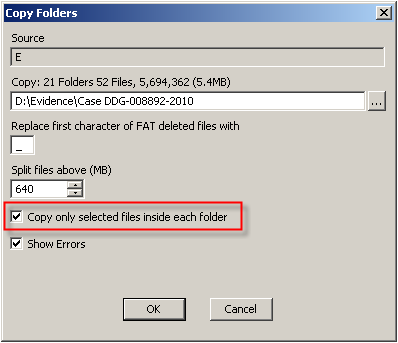
Make sure you have selected 'Copy only selected files inside each folder'. EnCase will then copy the Temporary Internet Files folder with all of the selected files and keep the original structure on the suspect disk.
Opening the Temporary Internet Files within NetAnalysis
From the File Menu, select 'Open All History from Folder', as shown in below. This will allow you to select the root folder you have exported from EnCase (or any other method used to export the required data).

Once the data has been imported, you will be ready to review the live cache entries and rebuild web pages. Please ensure you have filtered the cache entries you require. To quickly filter the live web pages, use the shortcut key F6. The cache entries are shown with a type 'cached' (see below).
Double clicking on any live cache entry will result in the page being rebuilt and loaded into QDV, the lightweight viewer supplied with NetAnalysis. You can also right click on an entry and select 'Rebuild and View Cached Page or Item'.
If you have not set an Export Folder for this workspace, you will be prompted to do this. The Options form will open and the Case Data Paths page will be displayed. Please select a folder to export your data to.

NetAnalysis will use this folder to export rebuilt web pages and viewed cached items. Once the page has been rebuilt, it will be loaded into the built-in QDV viewer as shown below.
QDV will allow you to view the source of the page by selecting View >> Source. You can also print the page at this point if you wish. Selecting 'Open Containing Folder' from the Tools menu will open your Export Folder and highlight the rebuilt web page.
The Title Bar in QDV will indicate the full path of the rebuilt web page. As you can see, this page has been exported with the name 'F0000008101.html'. This is so you can easily link the page back to the workspace. The number 8101 refers to the Unique Reference Number (URN) allocated to each entry in the workspace.

This page shows a rebuilt Hotmail page. All of the page elements (such as the images for this page) have all been extracted from the user's cache. NetAnalysis extracts these items and also writes them out to the Export Folder in a sub folder called Exported Web Items. The page is then edited so that it can locate the elements it requires in the F0000008101_files folder. The paths are relative so that your export folder can be copied to another location (or to external media).

In adition to the exported pages, NetAnalysis creates an audit log (contained within a folder called “Exported Web Pages_Audit”) which details the changes made during the rebuild. The following screen shot is part of the audit log from the Hotmail page above.

It shows the original URLs for each element in the page, the original cache file name and folder as well as the newly renamed cache items. If the cached item is from an embedded cached system sych as Firefox, it will also give the File Offset and Length of the original data in the cache block file.
Tuesday, 13 September 2011
i'm going to play around javascript frameworks
i'm going to build up a online gallery which collect the digital works.
Then i start to search which technic is better to make online gallery.
the criterias of best gallery are fast preload and fluence of cause these are based on high quality.
here if anyone want use javascript frameworks to realize some cool interface, i recommend Jquery and mootools. JQuery as we all known is most popular framework right now and it is accepted by its lightweight and nice effects. so i dont talk about JQuery too much here. what i want to say is that mootools is another pretty good javascript framework which is released recently, so not too many people are familiar with mootools. actually it is as good as JQuery even some effects are unique that other framework can't compete with. i will introduce more experience in the later use of mootools, i am just starting to know about it. i hope some mates who have the same interest on javascript framework can care my later blog about frameworks and also you can recommend me some other excelente frameworks.
Then i start to search which technic is better to make online gallery.
the criterias of best gallery are fast preload and fluence of cause these are based on high quality.
here if anyone want use javascript frameworks to realize some cool interface, i recommend Jquery and mootools. JQuery as we all known is most popular framework right now and it is accepted by its lightweight and nice effects. so i dont talk about JQuery too much here. what i want to say is that mootools is another pretty good javascript framework which is released recently, so not too many people are familiar with mootools. actually it is as good as JQuery even some effects are unique that other framework can't compete with. i will introduce more experience in the later use of mootools, i am just starting to know about it. i hope some mates who have the same interest on javascript framework can care my later blog about frameworks and also you can recommend me some other excelente frameworks.
Sunday, 14 August 2011
hey fellows, i got my own website but it's still under construction, welcome to visit
we also have our own forum, see my website here http://www.alexvisualstudio.com/
And i'm waiting for your advices
Thursday, 4 August 2011
i found a host which seems good
this is the link of the ads : http://www.lunarpages.com/w3schools/
if sign up via this website we can get 25$ off for a year and the normal charge 4.95$/mon
it seems attractive, isnt it?
by the way. w3schools has really good HTML tutorial for learners, just search w3schools. thats what i want share with you guys
if sign up via this website we can get 25$ off for a year and the normal charge 4.95$/mon
it seems attractive, isnt it?
by the way. w3schools has really good HTML tutorial for learners, just search w3schools. thats what i want share with you guys
first class of DMT
i had my first class of Digital Media Technology on this tuesday. from the introduction i know that this subject is about building up a website then i realize i need to start learning some basic programming language coz i never touch this code before. a litter pressure......
Subscribe to:
Posts (Atom)